Docusaurus
Segment membership
This package only evaluates published targeting lists. It has no membership write API and must not hold a Backend application key.
Update members from your backend. Call membership from a Node server, for example the Node.js SDK. Flow.
Frontend telemetry
@ops-ai/toggly-docusaurus-plugin 0.10.0 adds compact browser telemetry.
Plugin and provider options accept enableTelemetry, metricsBaseUrl, and
telemetryFlushIntervalMs; provider config can also supply telemetryFetch and
onTelemetryDiagnostic.
import { useToggly } from '@ops-ai/toggly-docusaurus-plugin/client'

export function CheckoutTelemetry({
  onOpenPricing,
}: {
  onOpenPricing: () => void
}) {
  const toggly = useToggly()

  const handleCheckout = async () => {
    toggly.recordUsage('Checkout', 'control')
    toggly.incrementCounter('orders', 2)
    toggly.setGauge('cartItems', 3)
    await toggly.flushTelemetry()
  }

  const handleOpenPricing = async () => {
    onOpenPricing()
    toggly.recordView('PricingTable', 'control')
    await toggly.flushTelemetry()
  }

  return (
    <>
      <button onClick={handleCheckout}>Checkout</button>
      <button onClick={handleOpenPricing}>Open pricing</button>
    </>
  )
}
Render this component beneath TogglyProvider. Record an explicit view from
the interaction or navigation boundary that actually presents it, never from
component render. Each provider owns one reporter and releases it after final
unmount. Navbar gating uses a separate short-lived owner. SSR and builds stay
silent. Static
gating can still report real browser evaluations when a public browser key is
configured; set enableTelemetry: false for a silent static runtime. Trusted
Cloudflare edge enforcement keeps its existing server telemetry behavior. See
the frontend telemetry contract.
Framework-agnostic browser client
@ops-ai/toggly-client-core 0.5.1 exposes the same compact API for applications
that do not use the Docusaurus provider. Browser-aware bundlers select its
browser condition; other runtimes use the portable, telemetry-silent entry.
import { createTogglyClient } from '@ops-ai/toggly-client-core'

const client = createTogglyClient({
  appKey: 'your-app-key',
  environment: 'Production',
  metricsBaseUrl: 'https://metrics.toggly.io',
})

await client.getFlag('NewCheckout')
client.recordUsage('NewCheckout')
client.recordView('NewCheckout', 'experiment-a')
client.incrementCounter('orders')
client.setGauge('cartValue', 19.5)
await client.flushTelemetry()
client.dispose()
Use @ops-ai/toggly-client-core/browser only with bundlers that do not honor
the browser export condition. Awaited flush is best-effort queue draining; it
does not guarantee server acknowledgement.
Toggly’s Docusaurus plugin lets you control the visibility of sections, links, and pages of your documentation instantly—no redeploys required—so your docs always match what users can actually access.
Grab the printable Docusaurus cheat sheet (download PDF) — plugin config, page gating, navbar links, edge enforcement.
Session identity
Set instanceId in the browser provider's config. Rotate or clear it by
updating that config with the new complete user context; use an empty token and
identity plus empty groups/claims for logout. Do not put a per-user minted token
in a shared static build config.
For the generic client, await
client.setContext({ identity: 'user-123', instanceId: 'minted-token' }).
Omitted fields retain their values, including the token when only identity
changes: clear it explicitly using
client.setContext({ identity: '', instanceId: '', groups: [], claims: {} }).
Both owners preserve admitted events' original attribution. See
session attribution.
Quick start
- Install the plugin:
npm install @ops-ai/toggly-docusaurus-plugin# oryarn add @ops-ai/toggly-docusaurus-plugin
- Add it to
docusaurus.config.ts:plugins: [['@ops-ai/toggly-docusaurus-plugin',{baseURI: 'https://definitions.toggly.io',appKey: process.env.TOGGLY_APP_KEY ?? 'YOUR_APP_KEY',environment: process.env.TOGGLY_ENVIRONMENT ?? 'Production',flagDefaults: {}, // optional fallbacksisDebug: process.env.NODE_ENV === 'development',},],]; - Restart
npm startso the plugin loads the new configuration.
Browser crypto bundling
If the browser build cannot resolve crypto from the signature verifier, add a local webpack configuration plugin to docusaurus.config.ts. The SDK uses native WebCrypto in browsers; only its guarded Node branch needs Node's crypto module.
Define this plugin above your existing configuration object:
import type { Plugin } from '@docusaurus/types';

function browserCrypto(): Plugin {
  return {
    name: 'toggly-browser-crypto',
    configureWebpack(_config, isServer) {
      return isServer
        ? {}
        : { resolve: { fallback: { crypto: false } } };
    },
  };
}
Add browserCrypto alongside the Toggly plugin in your existing plugins array:
plugins: [
  browserCrypto,
  ['@ops-ai/toggly-docusaurus-plugin', {
    appKey: process.env.TOGGLY_APP_KEY,
    environment: process.env.TOGGLY_ENVIRONMENT ?? 'Production',
    flagDefaults: {},
  }],
],
The isServer check preserves Node crypto for server rendering. The browser fallback does not provide a polyfill or disable verification; configure verifySignatures: true on your browser provider or core client when evaluating signed definitions. Serve the browser application over HTTPS or localhost so WebCrypto is available. Run npm run build after applying the configuration.
See Docusaurus's configureWebpack lifecycle API and webpack's resolve.fallback. Keep any existing plugins and configuration entries when adding this browser-only setting.
Initial browser targeting
Pass known user context when mounting the provider. For a standalone client,
pass the same fields to createTogglyClient from @ops-ai/toggly-client-core.
import { TogglyProvider } from '@ops-ai/toggly-docusaurus-plugin/client';

<TogglyProvider config={{
  appKey: 'your-app-key',
  identity: 'user-123', // Stable browser-user identifier.
  groups: ['beta'], // Memberships used by targeting rules.
  claims: { plan: 'pro' }, // String rule attributes.
}}>
  <App />
</TogglyProvider>
The client captures context before the first request. A client retains its own context and evaluated cache; remount with a new client/provider when the context changes. Omitted identity stays anonymous, and empty groups/claims add no memberships/attributes. Up to 20 nonempty claims are sent; blank groups are omitted.
The same fields in plugin options are public build-time defaults embedded in the browser bundle. They are not per-user authentication or secrets. They do not change static build-time gating or edge-worker evaluation.
Enable the Toggly client-side API and create an App Key
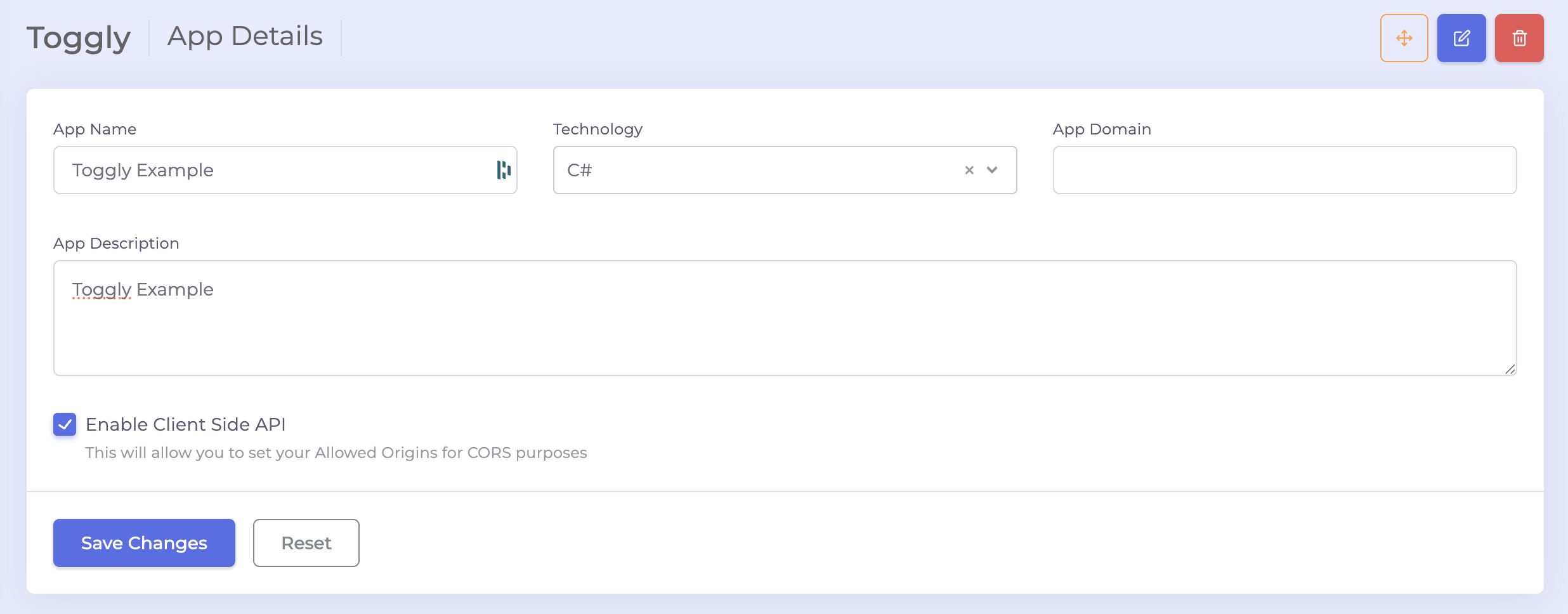
- In Toggly, open your app and go to App Settings. Check Enable Client Side API to allow browser access for the docs.
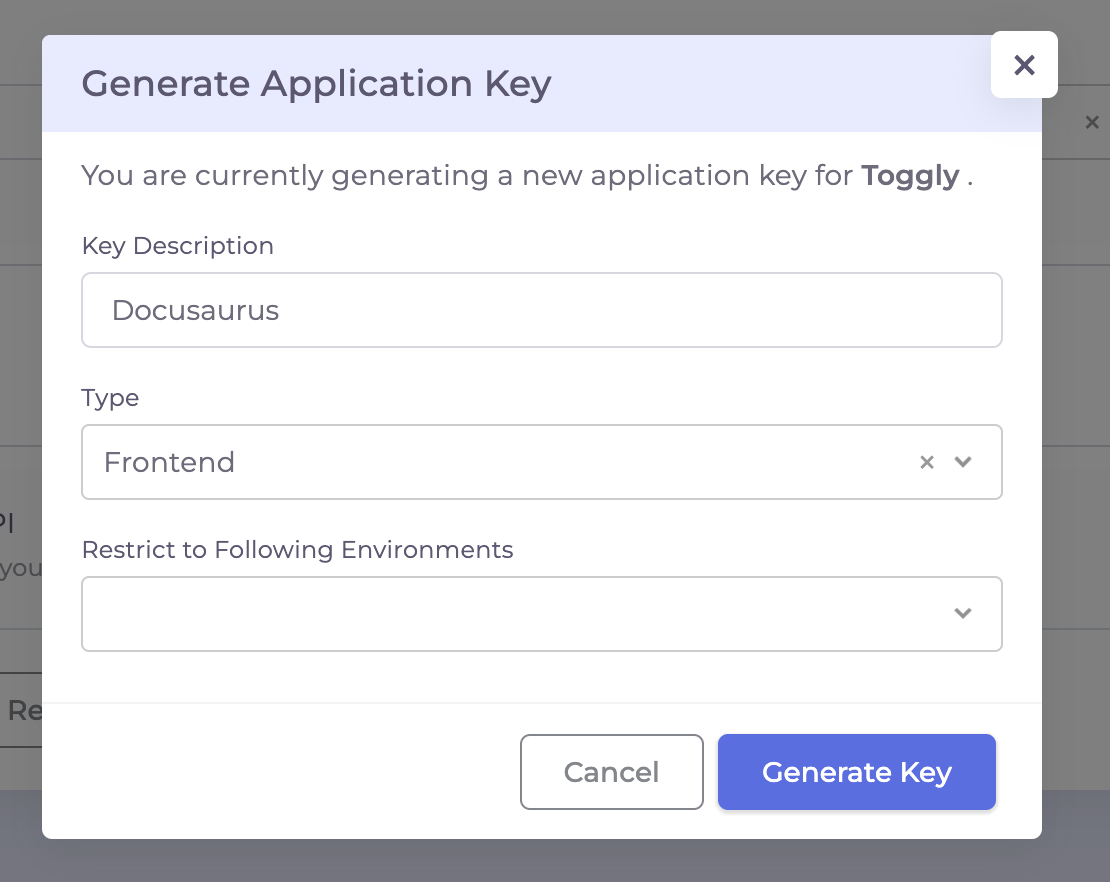
- Click Generate App Key, choose a description, set Type = Frontend, and generate the key for the environment you'll use in the docs.
- Use that key as
TOGGLY_APP_KEYin your Docusaurus config/env, and setTOGGLY_ENVIRONMENTto the matching environment (e.g., Production or Staging).
What it does
- Fetches flags server - and client-side so docs can conditionally render content.
- Exposes a lightweight client for reading flag values in the browser.
- Gates navbar links using an auto-generated page → feature map, hiding links whose feature flag is off.
Gating navbar links and pages
- Add
x-feature: <flag-key>in a doc’s frontmatter. The plugin scans all MD/MDX files, normalizes their routes (drops numeric prefixes, handlesindexfiles, prefixes/docs), and builds the route → flag map. - At build time, it injects that map as
__TOGGLY_PAGE_FEATURES__(and onwindow) automatically. - The client-side gate reads the map and removes navbar/menu links whose feature is
false. - If flags cannot be fetched, the gate fails open so links remain visible.
Recommended env vars
TOGGLY_APP_KEY: Your app key from Toggly.TOGGLY_ENVIRONMENT: e.g.,Production,Staging,Development.
Notes
- Keep
flagDefaultsminimal; use them only as safe fallbacks in case the API is unavailable. - For SSR/edge stripping of gated pages, pair the plugin with your edge worker to strip content when flags are off. Elements marked
data-toggly-negate="true"(from<Feature negate>) are left for client hydration. - The client-side plugin hides links only in the browser. It intentionally keeps links visible when flags cannot be fetched, so a transient client fetch failure does not make docs navigation disappear.
Feature component (MDX / React)
Use <Feature> for section-level gating in MDX or React. Set negate for the off path — the same pattern as Next.js and .NET <feature negate>:
import { Feature } from '@ops-ai/toggly-docusaurus-plugin/client';

<Feature flag="beta_advanced_filters">
  <h2>Advanced Filters (Beta)</h2>
  <p>Shown when the flag is on.</p>
</Feature>

<Feature flag="beta_advanced_filters" negate>
  <p>Shown when beta is off.</p>
</Feature>
With an edge worker, positive data-feature wrappers are stripped when the flag is off. Negated wrappers stay in the HTML so hydration matches the client tree.
Edge gating
Client-side gating hides content from the UI but leaves it visible in the HTML source and reachable via direct URL. To truly prevent disabled content from being served, pair the plugin with the Toggly Docusaurus Edge SDK — a small piece of Cloudflare-side code that:
- reads
/toggly-page-features.json(which the plugin emits at build time), - fetches the live flag map from Toggly,
- returns 404 (or redirects) on requests for pages whose flag is off, and
- streams every HTML response through
HTMLRewriterto remove[data-feature]blocks for disabled flags before bytes hit the browser (negateddata-toggly-negatewrappers are kept for client hydration).
The SDK ships two installation paths. Pick the one that matches where you host the site today.
Option A — Cloudflare Pages Function (recommended on Pages)
If your Docusaurus site is already deployed on Cloudflare Pages, drop a single middleware file into the project. No second deploy, no separate domain, no Cloudflare Access service-token to manage, no extra npm deps — the middleware is a single self-contained file.
1. Add the middleware
Copy functions/_middleware.ts from
Toggly.FeatureManagement/toggly-docusaurus-edge-sdk/cloudflare/pages-function
into your Docusaurus project as functions/_middleware.ts:
mkdir -p functions
curl -o functions/_middleware.ts \
  https://raw.githubusercontent.com/ops-ai/Toggly.FeatureManagement/main/toggly-docusaurus-edge-sdk/cloudflare/pages-function/functions/_middleware.ts
The functions/ folder is a Cloudflare Pages convention — every file you
put there is auto-bundled and runs at the edge in front of your static
assets on the next deploy.
2. Set environment variables
In the Cloudflare dashboard → your Pages project → Settings → Environment variables, add the following for Production (and Preview if you want gating on preview deploys):
| Variable | Required | Description |
|---|---|---|
TOGGLY_API_BASE_URL | Yes | https://definitions.toggly.io |
TOGGLY_ENVIRONMENT | Yes | Matches the environment you set in docusaurus.config.ts |
TOGGLY_APP_KEY | Yes | A Frontend app key from Toggly. Mark as a Secret. |
TOGGLY_PAGE_GATE_BEHAVIOR | No | 404 (default) or redirect |
TOGGLY_REDIRECT_URL | No | Redirect target when behavior is redirect. Defaults to /. |
3. Deploy
git add functions
git commit -m "Add Toggly edge middleware"
git push
Cloudflare Pages rebuilds, picks up the new function, and starts applying gating on the next request.
4. Verify
# Hydration snapshot should be present in HTML responses:
curl -s https://docs.your-domain.com/ | grep -o '__TOGGLY_EDGE_FLAGS__.\{0,80\}' | head -1

# A page gated by an OFF flag should now 404:
curl -I https://docs.your-domain.com/<a-gated-page>
Option B — Standalone Cloudflare Worker (for non-Pages origins)
If your site is on GitHub Pages, Netlify, Vercel, S3 + CloudFront, your own server, or anywhere other than Cloudflare Pages, deploy the standalone Cloudflare Worker in front of it. The Worker fetches HTML from your existing origin and applies the same gating logic.
The Worker source and wrangler.toml template live at
Toggly.FeatureManagement/toggly-docusaurus-edge-sdk/cloudflare/worker.
Quick install
git clone https://github.com/ops-ai/Toggly.FeatureManagement.git
cd Toggly.FeatureManagement/toggly-docusaurus-edge-sdk
pnpm install
cd cloudflare/worker
# edit wrangler.toml: set the route pattern + ORIGIN_BASE_URL for your site
wrangler secret put TOGGLY_APP_KEY --env production
wrangler deploy --env production
The Worker needs:
| Variable | Required | Description |
|---|---|---|
TOGGLY_API_BASE_URL | Yes | https://definitions.toggly.io (set in [vars]) |
TOGGLY_ENVIRONMENT | Yes | Matches the environment in your Docusaurus config |
TOGGLY_APP_KEY | Yes | Frontend app key (wrangler secret put) |
ORIGIN_BASE_URL | Yes | Where the Worker fetches HTML from (e.g. https://my-docs.netlify.app) |
TOGGLY_METRICS_BASE_URL | No | Usage/metrics gateway (default https://app.toggly.io/) — not the definitions host |
TOGGLY_USAGE_ENABLED | No | true/false; defaults on when TOGGLY_APP_KEY is set |
TOGGLY_METRICS_ENABLED | No | true/false; defaults on when TOGGLY_APP_KEY is set |
CF_ACCESS_CLIENT_ID | If origin is Access-gated | Cloudflare Access service-token client ID |
CF_ACCESS_CLIENT_SECRET | If origin is Access-gated | Cloudflare Access service-token client secret |
Usage + metrics (Worker HTTPS telemetry)
The standalone Docusaurus Worker batches feature check/view usage and business metrics, then POSTs JSON to:
{TOGGLY_METRICS_BASE_URL}api/usage/stats{TOGGLY_METRICS_BASE_URL}api/metrics
Workers cannot use native gRPC. Flushes run via ctx.waitUntil after the response path so gating and HTML rewriting stay unblocked. Soft-fail on send errors — pending batches are restored in memory.
wrangler.toml already sets TOGGLY_METRICS_BASE_URL = "https://app.toggly.io/". Opt out per environment:
[vars]
TOGGLY_USAGE_ENABLED = "false"
TOGGLY_METRICS_ENABLED = "false"
The Pages Function path (Option A) does not currently ship the same usage/metrics batcher — use Option B (Worker) or the general Cloudflare Workers integration when you need edge HTTPS telemetry.
Same gateway contract as Next.js edge and the public Cloudflare Workers docs page.
Pages-and-Worker gotcha. If your domain is also a Pages custom domain, removing it from the Pages project (or pointing the Worker at a different origin URL like a Pages branch alias) is required — otherwise the Worker can recurse into itself or be bypassed by Pages. See the Worker README for the routing setup.
Which one should I use?
| Your situation | Pick |
|---|---|
| Site is on Cloudflare Pages | Option A (Pages Function) |
| Site is on GitHub Pages / Netlify / Vercel / S3 / your own server | Option B (Worker) |
| You want the edge transform to be a separate deploy from the static site | Option B (Worker) |
| You want zero new infra (one repo, one deploy) | Option A (Pages Function) |
Both runtimes do the same three things — read the manifest, fetch the flag
map, and run HTMLRewriter to strip disabled [data-feature] blocks and
inject the hydration-safe window.__TOGGLY_EDGE_FLAGS__ snapshot. They
just differ in where they run and how they read the static HTML.
Edge cache reliability
The Docusaurus edge worker preserves the last-known-good page manifest and flag
cache when a transient fetch fails. It does not replace a valid cache with an
empty fallback just because /toggly-page-features.json or the Toggly
definitions endpoint was temporarily unavailable.
This keeps edge gating predictable:
- disabled pages continue to be stripped or 404'd using the last valid data;
- temporary upstream failures do not broaden access by clearing the manifest;
- temporary upstream failures do not hide every gated page by caching
{}.
The worker does not expose an application-level onError callback. Use
Cloudflare Worker logs or observability for edge runtime failures. For the
shared SDK behavior, see
Reliability and Error Handling.
Entity context with the core client
The plugin's <Feature> component and page/navbar maps accept boolean flags;
they do not accept entity props. For a per-block entity check, use the separate
@ops-ai/toggly-client-core client and render its boolean result. Entity checks
are not evaluated by the edge HTML rewriter.
import { useEffect, useState } from 'react';
import { createTogglyClient } from '@ops-ai/toggly-client-core';

type Section = { id: string; audience: string };

export function PremiumBlock({ appKey, section }: { appKey: string; section: Section }) {
  const key = JSON.stringify([appKey, section.id, section.audience]);
  const [result, setResult] = useState<{
    key: string; enabled: boolean; error: string | null;
  } | null>(null);

  useEffect(() => {
    if (!appKey) return;
    let active = true;
    const client = createTogglyClient({ appKey });
    client.registerContext<Section>('DocSection', (item) => ({
      kind: 'DocSection', key: item.id,
      attributes: { Audience: item.audience },
    }));
    client.getFlag('PremiumBlock', false,
      { id: section.id, audience: section.audience }, 'DocSection')
      .then((enabled) => { if (active) setResult({ key, enabled, error: null }); })
      .catch(() => {
        if (active) setResult({ key, enabled: false, error: 'Unable to evaluate this section' });
      });
    return () => {
      active = false; // Ignore responses after unmount or a context change.
      client.stopWebSocket();
    };
  }, [appKey, section.id, section.audience, key]);

  if (!appKey) return <p>Configure your Toggly app key.</p>;
  // Never show an earlier entity's result while the next check is pending.
  if (result?.key !== key) return null;
  if (result.error) return <p role="alert">{result.error}</p>;
  return result.enabled ? <section>Premium content</section> : null;
}
For lists, reuse a core client for one fixed user context and pass each entity to
getFlag. Supply known identity, groups, and claims when creating that client;
recreate it when user targeting changes. An entity mapper does not change user
identity or register a schema with the dashboard. Missing entity context fails
closed. UI gating is not a substitute for server-side authorization.
Sample references
Browse the Toggly Samples catalog for hands-on examples. Start with a sample’s README for setup instructions, then follow its source walkthrough to see how configuration, flag checks, and UI behavior fit together.
Try the Docusaurus showcase and its README. Follow the setup and first-flag exercise, then use the source map to trace native MDX gates, programmatic checks, and Order context.